


EndeavorOTC®: Outplay ADHD
3.5255.00 Reviews
App Specs
- Version
- 4.0.1
- Updated On
- License
- Free
- Downloads
- 50,000+
- Developer
- Akili Interactive Labs, Inc.
- Categories
- Medical
- Platform
- Android
Screenshots

 Analysis by AppCompare
Have you ever felt like your brain is a bit too scattered for its own good? You're not alone. Whether it’s the constant ping of notifications or the endless list of tasks, keeping your mind focused can be a real challenge. This is where EndeavorOTC®: Outplay ADHD comes into play. I’ve had the chance to dive into this app, and trust me, it’s worth the hype if you're looking to sharpen your mental edge.
When the novelty is doing the work
The first sessions have an obvious advantage: a game feels more inviting than another reminder to concentrate. That can make starting easier, especially for someone who already finds ordinary practice dull. I would treat that early enthusiasm as a useful opening, not proof that the app has become a lasting routine. The real test is whether it still feels worth opening after the newness wears off.
A practical way to judge that is to connect a session to a moment that already exists in your day. For example, someone who has trouble settling into desk work might try a session before opening a long assignment, then notice whether beginning the assignment feels any different. That observation is more useful than expecting a game score to translate automatically into better focus everywhere.
I’d also keep expectations modest and specific. A digital training tool can offer structured practice, but it should not be treated as a guaranteed fix for ADHD or as a replacement for care from a qualified clinician. If you are considering it for a child, I would involve the child in deciding whether the format feels comfortable and discuss its role with their healthcare professional rather than presenting it as a cure.
A Brainy Adventure
First things first, what exactly is EndeavorOTC®: Outplay ADHD? Well, it’s a cognitive training app designed to help improve attention and focus, particularly for those with ADHD. But don’t worry if you don’t have a diagnosis—anyone can benefit from its brain-boosting exercises. The app was born out of serious science and loads of research, promising a legit way to upgrade your mental game.
Getting Started
Downloading and setting up the app is a breeze. Available on both Android and iOS, I found it on the app store and was ready to roll in minutes. The interface is sleek, intuitive, and doesn’t throw you into the deep end. You start with a short assessment that tailors the experience to your unique needs. It’s like having a personal trainer, but for your brain.
EndeavorOTC is a free medical app from Akili Interactive Labs, Inc., with in-app purchases ranging from $15 to $129.99 per item, so I’d check the purchase details before committing to anything beyond the free experience. Its age rating is Everyone, but that label is not a substitute for deciding whether a medical product is appropriate for a particular person. The app has a 3.4 average from 404 ratings, and 50K+ installs; those figures suggest people have tried it, but they don’t tell me whether it will suit your routine or needs.
Worth Reading Before You Choose

EA SPORTS FC Mobile 26 Is a Bigger Football Game, but It Takes Time

Flipboard Shows What News Apps Must Do Beyond the Feed

Switching to Android Auto Means Rethinking Your Driving Routine

Google Calendar Makes a Crowded Week Easier to Manage

Ludo King Makes the Most of the Minutes Between Plans

Baby Panda World Brings Quick Play to Modern Phones, but Its Game Library Feels Busy
It was released on September 11, 2023, and its current version is 4.0.1, with Android 12 as the minimum OS. Those practical details matter if you are setting it up on an older phone or helping a family member get started. I’d make sure the device is compatible and that the person who will use it can comfortably navigate the app before paying for an in-app option.
Gameplay and Features
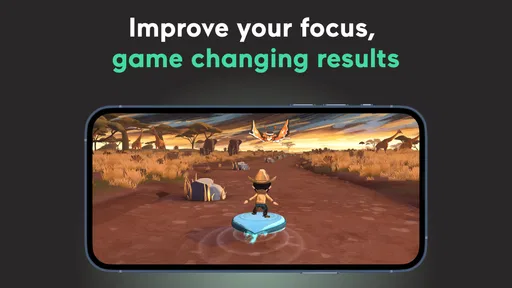
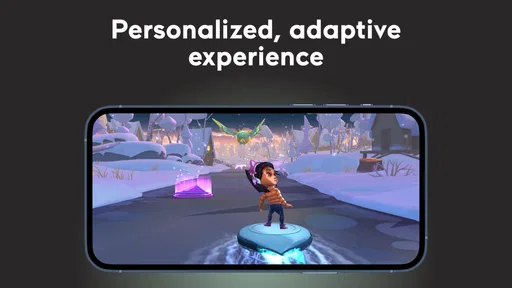
The app features a series of games that are as fun as they are challenging. Each game targets different cognitive skills like memory, attention, and problem-solving. They’re designed to be engaging, so you don’t feel like you’re slogging through a dull task. The graphics are vibrant, and the gameplay is smooth, making each session something to look forward to.
One of the standout features is the adaptive difficulty. The app adjusts the challenge based on how well you’re doing, keeping you on your toes without overwhelming you. Whether you're crushing it or need a bit of a nudge, EndeavorOTC® meets you where you are.
That game-based approach is also the main trade-off. Compared with a paper planner, a timer, or a simple checklist, this is more engaging practice but less direct help with remembering a specific appointment or breaking down tomorrow’s chores. I wouldn’t expect it to organize a workload for me. If your biggest obstacle is deciding what to do next, a calendar or task manager may be a better first tool; if you want a more inviting way to practise attention, the game format has a clearer purpose.
For a realistic routine, imagine opening the app before a study block because you often lose time avoiding the first page of reading. A session could act as a transition into work, but I’d still put the reading goal somewhere visible and silence distractions separately. The useful question is not simply whether the game felt enjoyable; it is whether this small ritual helps you move into the task without becoming another delay.
Tracking Your Progress
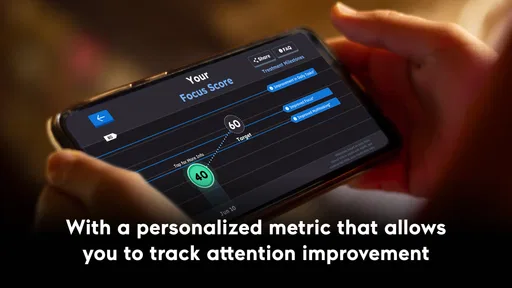
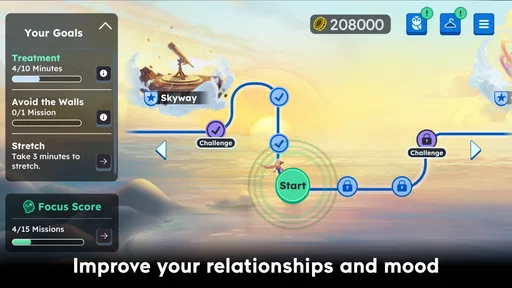
What’s the point of putting in all that effort if you can’t see how far you’ve come, right? The app offers detailed progress tracking, letting you see your improvements over time. It’s super motivating to watch your scores climb and know you’re making tangible progress. Plus, you get daily reminders to keep you consistent, which is a huge help if you’re prone to forgetting.
Progress screens and reminders can make practice easier to remember, but I would avoid treating a higher score as a complete measure of everyday attention. Scores describe performance in the app; real-life concentration also depends on the task, sleep, stress, environment, and other factors. A useful habit is to pair the app’s progress view with one brief real-world note, such as whether you started a planned task or stayed with it. That gives you a more grounded way to decide whether continued use feels worthwhile.
Reminders can help establish a rhythm, yet they can also become background noise if they arrive at an inconvenient time. I’d choose a moment when a session is realistic rather than trying to force it into the busiest part of the day. If a reminder repeatedly interrupts something important, it is not supporting the habit; it is adding friction. Consistency should mean finding a sustainable place for practice, not feeling guilty about every missed prompt.
The Science Behind It
Now, I’m not a neuroscientist, but the app is based on some serious brain research. Developed with input from cognitive scientists, EndeavorOTC®: Outplay ADHD isn’t just another gimmicky brain game. It’s legit. The app claims to enhance neural pathways to improve focus and attention, which sounds pretty fancy and important if you ask me.
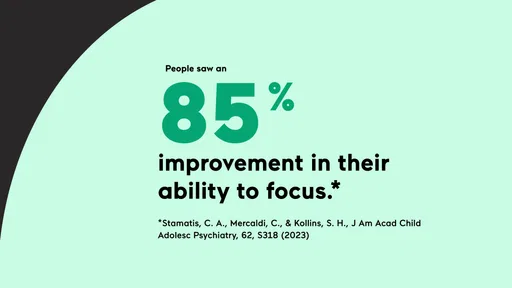
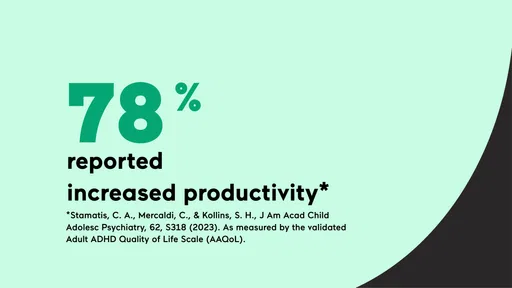
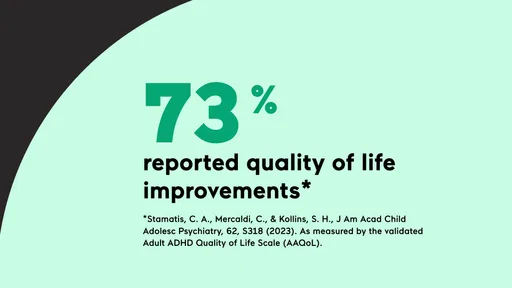
What’s more, the app has been reviewed by experts and is backed by clinical research. This isn’t just a marketing ploy—it’s a real tool that can make a difference in how you function day-to-day.
Its medical positioning makes it different from a casual puzzle collection, but I would still separate the existence of research from a promise about an individual result. If you are already working with a clinician, it makes sense to ask how a digital therapeutic might fit alongside your current plan. If you are not, the app can be something to explore, but it should not be your only response to difficulties that are seriously affecting school, work, relationships, or daily responsibilities.
Who Is It For?
While the app is designed with ADHD in mind, it’s great for anyone looking to boost their focus and cognitive skills. Whether you’re a student trying to stay on top of your studies or a professional juggling multiple projects, there’s something in it for you.
Parents might also find it helpful for their kids, especially if they’ve noticed attention issues. It’s a safe, non-invasive way to potentially help your child improve their focus.
I think it is most promising for someone who enjoys game-like practice, can make room for repeat sessions, and understands that the experience is meant to support—not replace—other strategies. Someone who dislikes games, wants immediate help planning a complicated week, or is looking for a stand-alone treatment may be better served elsewhere. A planner, coaching, therapy, medication discussions with a clinician, or a combination of supports can address needs this app is not designed to handle on its own.
What keeps it useful over time
Month-to-month value depends less on the first impression than on whether the routine remains manageable. I’d give myself a simple check-in after a stretch of regular use: Am I still willing to open it? Does it fit the time I have? Can I point to a practical reason to continue? If the answers are no, continuing just because I have already invested time would not make sense.
The app’s free entry point makes it possible to explore before deciding whether an in-app purchase is worthwhile, but I would not assume that every feature or level of access is included at no cost. Before buying, I’d read the purchase screen carefully, consider how often I genuinely expect to use it, and avoid paying on the strength of a single enjoyable session. A recurring tool earns its place through a repeatable routine, not through a promising first day.
There is also a fatigue risk in turning every spare moment into another self-improvement task. If the games start feeling like homework, or if reminders create pressure rather than support, scaling back or stopping is a reasonable choice. I would rather keep a small practice that fits comfortably than chase a perfect streak. That is especially important for ADHD, where an overly demanding routine can become one more source of frustration.
Final Thoughts
All in all, EndeavorOTC®: Outplay ADHD is a solid choice for anyone looking to enhance their mental capabilities. It’s fun, it’s engaging, and most importantly, it seems to work. Whether you're on Android or iOS, it’s worth giving it a spin. So, if you’re ready to take your brain for a workout, download the app and start your journey towards a sharper, more focused mind!
My longer-term view is more measured: it can earn a place for people who find its game-based practice genuinely approachable and who use it as one part of a broader plan. I would not keep it simply because the first week was entertaining, nor would I judge its value by scores alone. Try it with a clear, modest purpose, pay attention to how it fits real life, and be willing to choose a simpler or more suitable support if the habit does not stick.
Pros
- User-friendly interface for easy navigation.
- Effective tools for ADHD management.
- Personalized activity recommendations.
- Regular updates with new features.
- Offers progress tracking and insights.
Cons
- Requires a stable internet connection.
- Limited features in the free version.
- Occasional app glitches reported.
- Subscription can be expensive.
- Some features need more customization.
FAQs for EndeavorOTC®: Outplay ADHD
What is EndeavorOTC® and how does it help with ADHD?
EndeavorOTC® is a digital therapeutic app designed to help users manage symptoms of ADHD. It offers engaging, game-like exercises specifically developed to improve attention and focus. By using adaptive algorithms, the app tailors its challenges to each user’s needs, providing a personalized experience aimed at enhancing cognitive abilities over time.
Is EndeavorOTC® suitable for all age groups?
The app is designed for individuals aged 8 to 12 who have been diagnosed with ADHD. It provides age-appropriate exercises to help improve attention and focus. While it primarily targets children, parents and caregivers should consult with healthcare professionals to determine if it’s suitable for other age groups or specific needs.
What devices are compatible with EndeavorOTC®?
EndeavorOTC® is available for both Android and iOS devices. It requires a smartphone or tablet with a stable internet connection to download and run the app seamlessly. Users should ensure their device meets the minimum hardware and software requirements listed on the app’s download page for optimal performance.
Are there any costs associated with using EndeavorOTC®?
EndeavorOTC® may involve costs depending on the subscription model chosen. While some features might be available for free, others could require a subscription fee. Users should review the pricing details on the app store or official website for comprehensive information on any potential expenses before downloading.
How do I track progress while using EndeavorOTC®?
The app includes a built-in progress tracker that allows users and parents to monitor improvements in attention and focus over time. It provides detailed reports and feedback, making it easier to assess the effectiveness of the exercises. Regular updates and milestones help users stay motivated and engaged in their cognitive training journey.


